FJUST 101 | INSTALLATION GUIDE
Traditionally, MetaMask is used to swap in ETH but with high transaction fees we've decided our community is better served using BNB as our base token exchange rate.
Fee's under Binance Smart Chain are considerably less than the Etherium network. BNB fees are generally pennies on the dollar, so it’s helpful to always keep at least a few extra BNB in your wallet if you intend to add to the Fallen Justice liquidity pool or make future/recurring donations. |
STEP 1 | METAMASK:
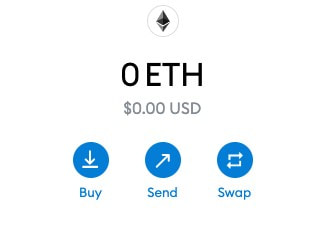
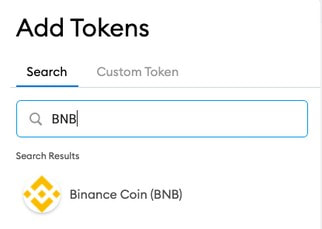
Head to MetaMask and download their wallet to your Smart Phone or Brave/Chrome/Firefox browser. You will use this wallet to store your FJUST Token. (*store your private key in a safe location and never share it with anyone) In Metamask you'll first acquire ETH using your debit or credit card. Click buy and enter the amount in dollars you'd like to donate. Next click add tokens to add BNB token to your asset list. Once selected it will appear under the same assets tab. used to add the ETH to your wallet.
|
|
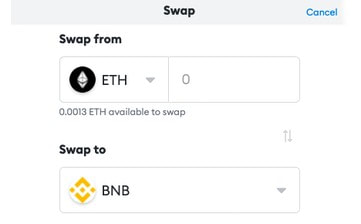
STEP 2: SWAP ETH FOR BNB
Now you're ready to swap ETH for BNB. Click swap (see image above) and enter your pair. Swap away! You now have BNB and can obtain FJUST. |
|

|
STEP 3 | SWAP BNB FOR FJUST:
Head to PancakeSwap. This is where you'll swap BNB for FJUST. PancakeSwap is a type of Decentralized Exchange (DEX) known as an automated market maker (AMM). This essentially means that there are no order books, bid/ask system or limit/market orders. Instead, users trading on the platform automatically draw liquidity from one or more liquidity pools, which then rebalance after the trade is complete. To learn more about AMM's, DEX's, liquidity read this article. |
|
If your MetaMask wallet is not connected PancakeSwap will prompt you to sync. If not, click “Connect” at the top right of the screen,
Once complete, in PancakeSwap, go to the trade screen. you can navigate to “Trade” on the left sidebar. |

|
Click on the “Select a Currency” button, and then enter the FJUST token contract address: 0x1f48f291f1845c8fea0ba6609e437ee43550c9fa
An import popup will appear asking if you want to import the FJUST token. Select the "I understand" checkbox and then click "Import".
You are now ready to swap for the Fallen Justice Token! Now when ever there's a project you'd like to support, simply load your MetaMask wallet with some BNB and head to PancakeSwap to snag your FJUST.
An import popup will appear asking if you want to import the FJUST token. Select the "I understand" checkbox and then click "Import".
You are now ready to swap for the Fallen Justice Token! Now when ever there's a project you'd like to support, simply load your MetaMask wallet with some BNB and head to PancakeSwap to snag your FJUST.